
Forwarded email in.
Booked ServiceM8 job out.
Black Ice reads the work orders landing in your inbox, matches the property, picks a qualified tech, and books the job in ServiceM8 — sending only the uncertain ones to a human.
Every work order used to be ten minutes of admin.
Find the property. Create the job. Attach the contact. Pick the category. Find a tech with the right skills who's actually free. Book it. Repeat all day.
On a board of 140+ live jobs, that's roughly a full day of typing every week — before anyone touches a tool.
Figures from the 42-email pilot corpus at Black Ice Heating & Cooling.
Inbox to booked, in three steps.
- 01
An email arrives.
An agency work order, a TAPI notification, or a direct customer request lands in your inbox. Nothing to install for senders.
- 02
Black Ice reads & matches it.
It extracts the property, tenant, job details and urgency, matches them against your live ServiceM8 data, and scores its own confidence.
- 03
Booked — or queued for you.
High confidence: job created, categorised and scheduled to a qualified tech. Anything uncertain waits in a review queue with a one-click approve.
The human step only fires when confidence is low.
Hi team, tenant reports the ducted heater not working at 14 Williams Rd, Mornington VIC 3931. Tenant is Sarah M, 0400 000 000 — please attend as soon as possible and invoice as per agreement.
14 Williams Rd, Mornington VIC 3931
Ducted Heater Repair · Sarah M attached as contact
Not sure about an email? It doesn't guess — the job waits in the review queue, and one click books it exactly like this.
It won't send an apprentice out solo.
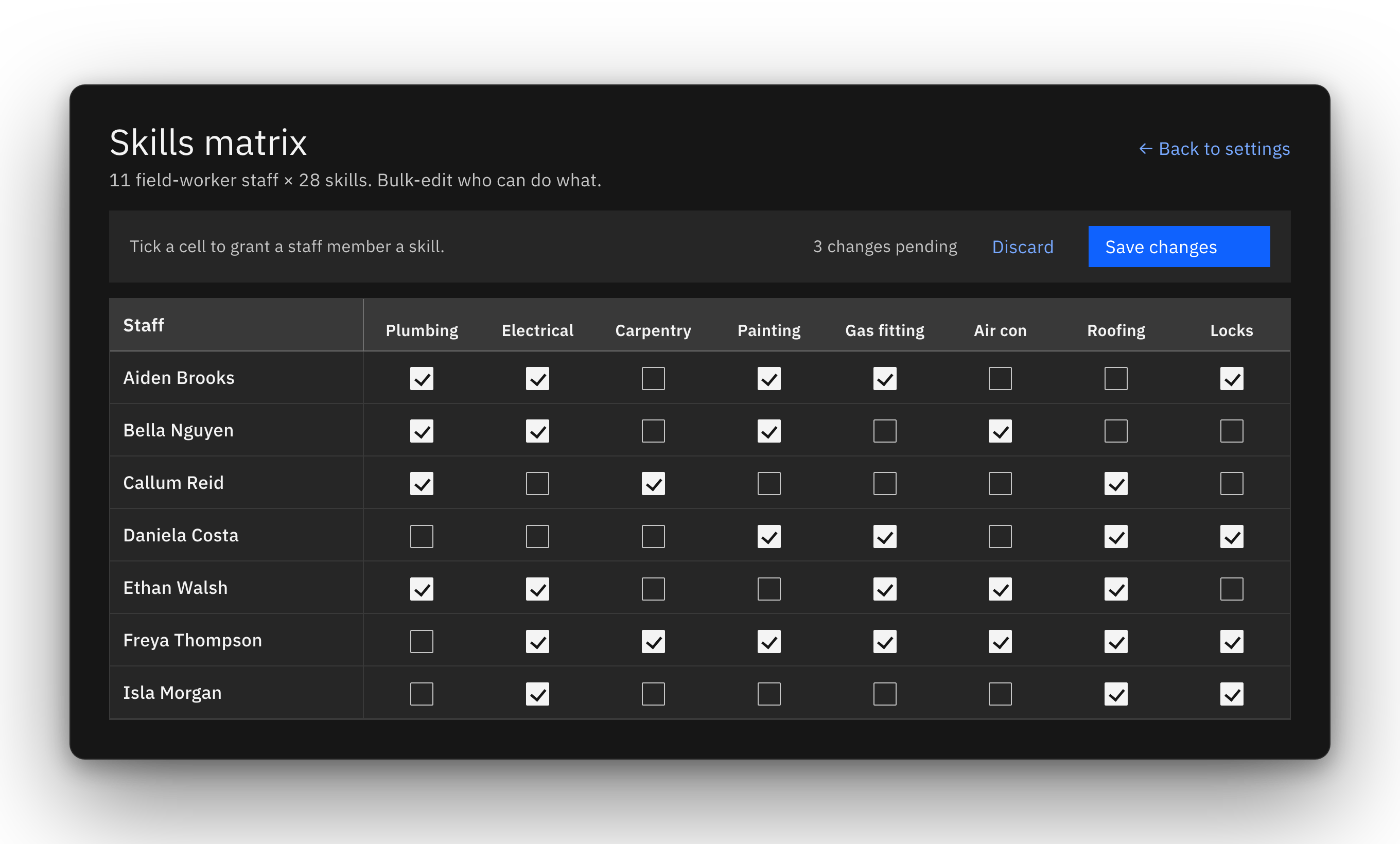
Picking "a free tech" is easy. Picking the right one is the job. Black Ice schedules against the rules your office already holds in its head:
- 01
28 skills per tech
From ducted heater replacement to VEU rebate jobs, at apprentice, qualified or lead level.
- 02
Solo-work rules
Apprentices and non-solo staff are never booked alone.
- 03
Leave & live bookings
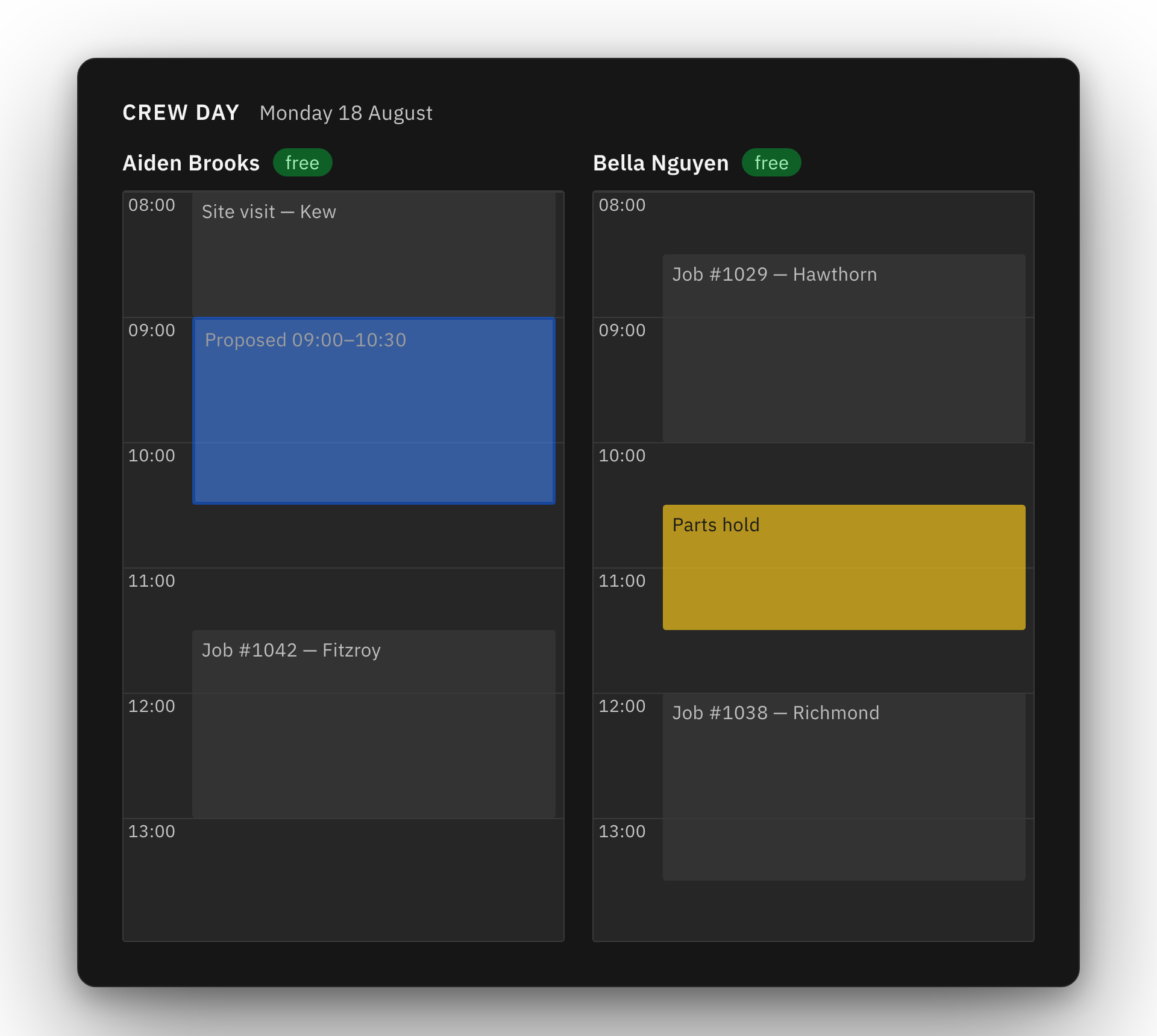
Annual leave and the real ServiceM8 diary block out the day automatically.
- 04
Travel from home base
Techs are picked with the drive in mind, not just the gap in the calendar.
And it shows you the tech's whole day before committing — so you can see the booking in context, not on faith.
The back office, minus the re-keying.
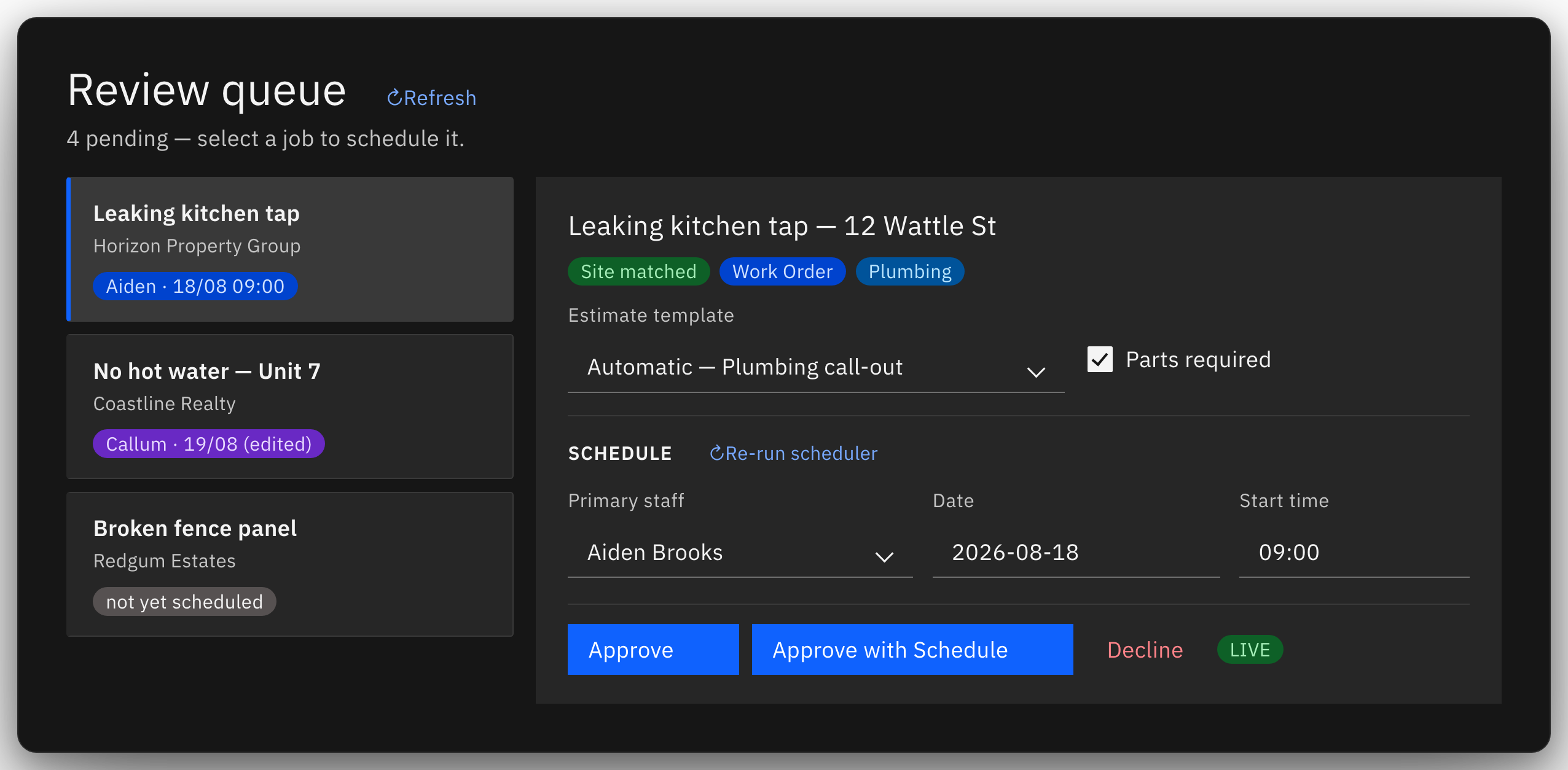
Review queue
Every uncertain email lands here with the reason it wasn't auto-booked. Approve, adjust, or reject in one click.
Job board
A drag-and-drop pipeline from Quote to Booked, plus the spreadsheet view your office already knows.
It learns your senders
Every approval teaches it which agency maps to which properties, so it asks less over time.
Parts & templates
Job categories pre-fill ServiceM8 templates and suggest required parts — jobs waiting on parts wear a visible hold badge until they're in stock.
Full audit trail
Every action — human or automated — is logged with who, what and why. Nothing happens silently.
Estimate templates
Job category picks the right call-out template and price automatically — override it in one dropdown.
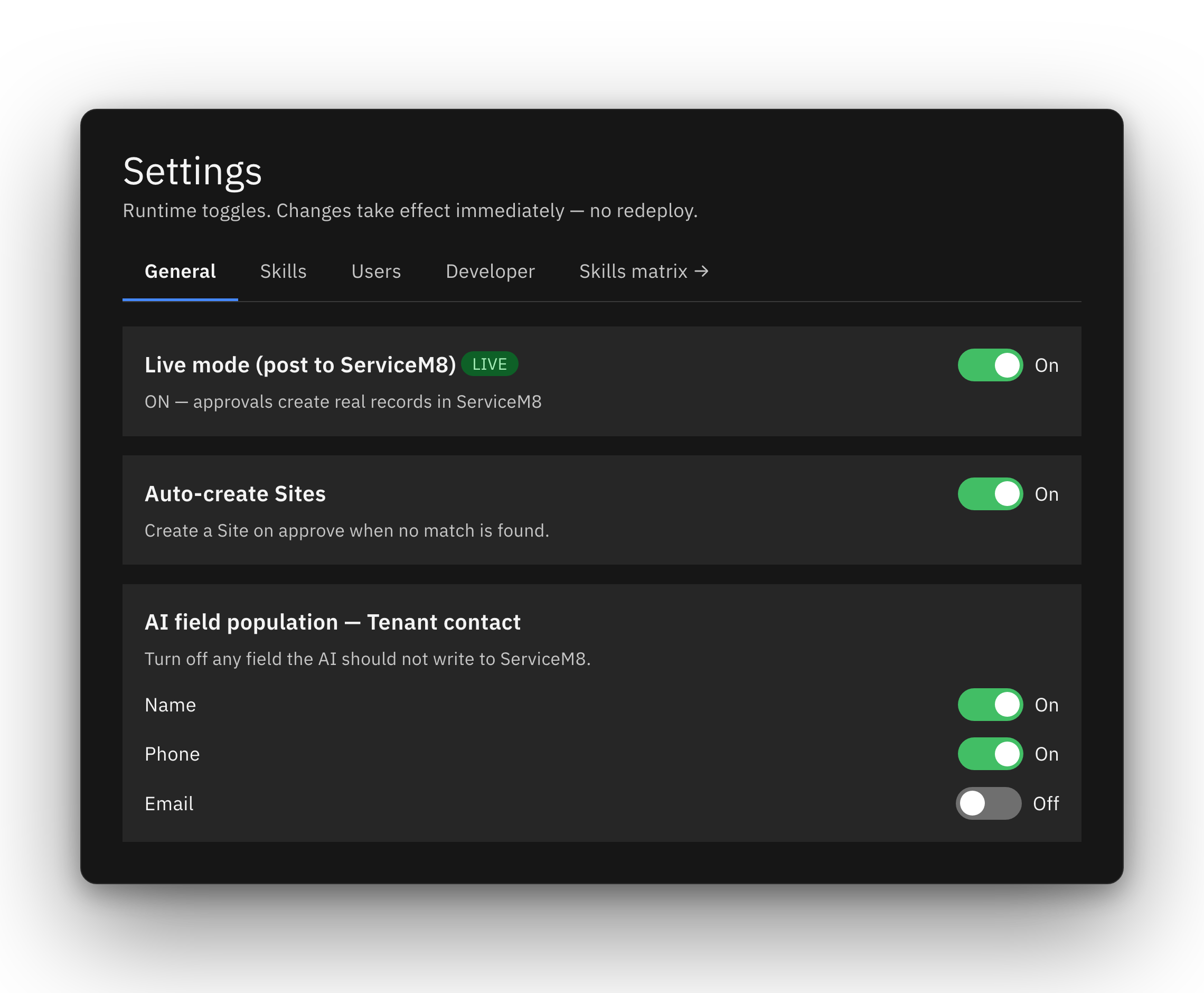
You decide how much it's allowed to do.
Starts in dry-run
Out of the box it only logs what it would do. You flip it live from the settings screen when you've watched it be right.
Per-field permissions
Let it write the job description but not the category — or the reverse. Every AI-written field is individually switchable.
ServiceM8 stays the source of truth
Black Ice writes jobs into ServiceM8 and reads changes back. It never becomes a second system your data lives in.
Your stack, your data
Self-hosted in your own environment, in Australia. Email bodies aren't retained; nothing leaves except the API calls you can name.
Run the day from one screen.
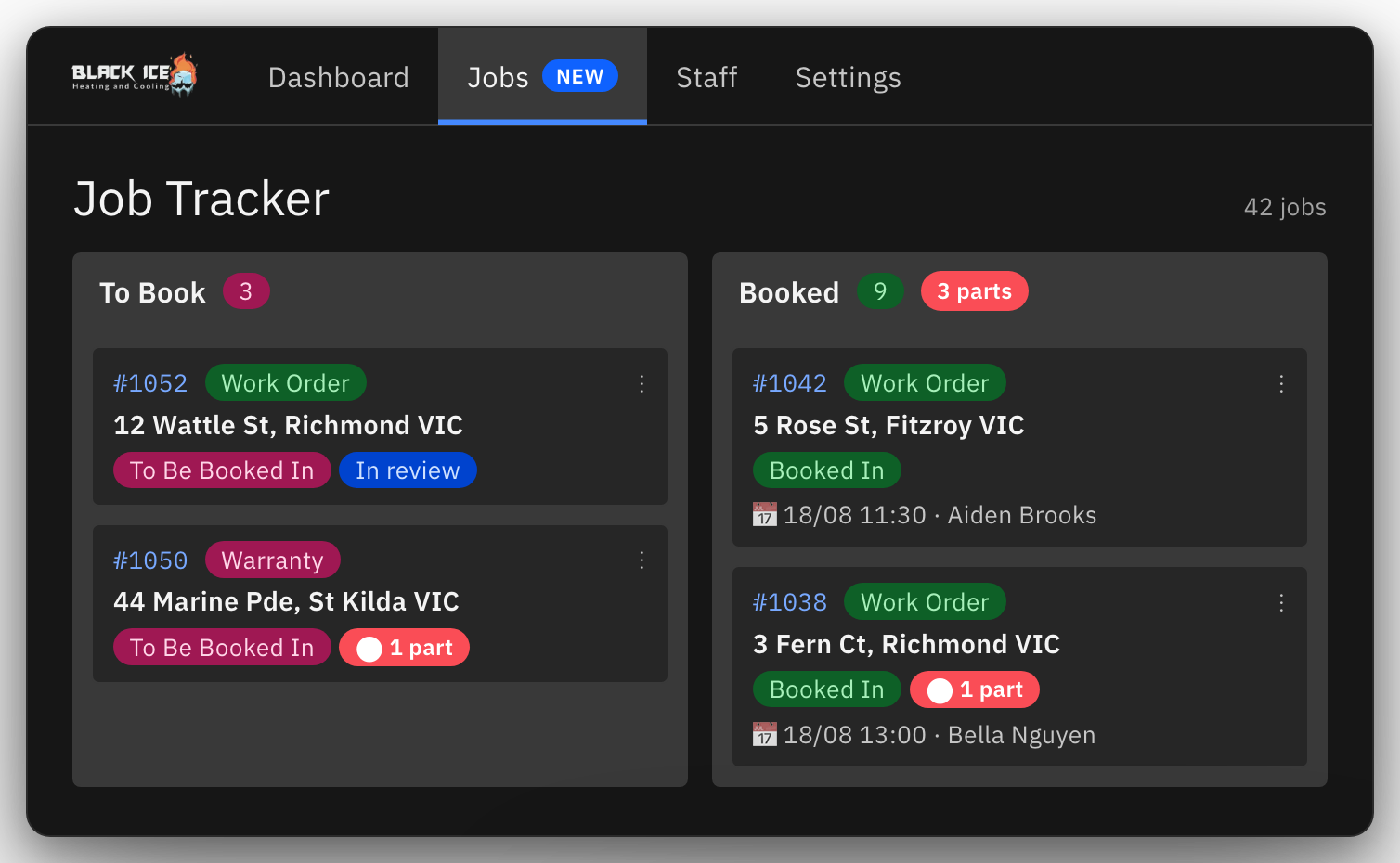
Jobs board
Kanban lanes from live job data — parts holds worn on the card, so nothing waiting on stock gets forgotten.
Review queue
Each held email shows exactly why it's waiting — and what one click will create.
"Real quote from the Black Ice office: what a Monday inbox looked like before, and what they do with the reclaimed hours now."
— Name, role · Black Ice Heating & Cooling, Melbourne
- 40 staff
- 10,000+ jobs in ServiceM8
- 88% matched / 83% auto-booked in pilot
One plan. Priced per office, not per email.
No per-seat maths, no metered emails. One flat plan for the whole office, scoped to your business on a call.
- Unlimited inbound work orders
- All features — review queue, scheduling, board, audit
- Self-hosted deployment & setup included
- Cancel any time; your data stays in ServiceM8
Straight answers, before the demo.
Will it create jobs without anyone checking?
Only if you tell it to. Black Ice starts in dry-run mode, where it logs what it would have done without touching ServiceM8. Once you flip it live, only high-confidence emails book automatically — and every action is logged with who, what and why.
What happens to emails it isn't sure about?
They wait in the review queue, each one showing the reason it was held — an unmatched property, an ambiguous job type, a missing contact. You approve, adjust or reject in one click, and every approval teaches it for next time.
Do our property managers have to change anything?
No. They keep sending work orders to the same address they always have — agency emails, TAPI notifications, PDFs and all. There is nothing for senders to install or learn.
Where does our data live?
Black Ice is self-hosted in your own environment, in Australia. Email bodies aren't retained, and nothing leaves your stack except the ServiceM8 API calls you can name. Your job data stays in ServiceM8, where it already lives.
What if someone edits the job in ServiceM8 directly?
That is expected. ServiceM8 stays the source of truth — Black Ice writes jobs in and reads changes back, so edits made in ServiceM8 flow through. It never becomes a second system your data lives in.
How long does setup take?
Deployment and setup are included. You start in dry-run mode on day one — watching what it would have done with your real mail — and flip it live whenever you're satisfied it's right.
See it running on your own inbox.
Bring a week of forwarded work orders to the demo — we'll show you what Black Ice would have done with every one of them. Dry-run mode replays your real mail safely.